Technical documentation
Overview
About OOAPI
About the broker
About enrollment
About the enrollment receiver
About openID and MyAcademicID
And more
Overview
This documentation focusses on the enrollment process after orientation of a student and a click on the register button. For more information about the orientation proces, please check the eduxchange profile.
To enable automated enrolment in an alliance, each institutions will play the role of the home institution (sending students out) and the host institution (receiving students). The home institution must have the required OOAPI endpoints available. The host institution will run a component called enrollment receiver for authentication and authorization. The host institution will always be in the lead for communication.
Overview of orientation and enrollment
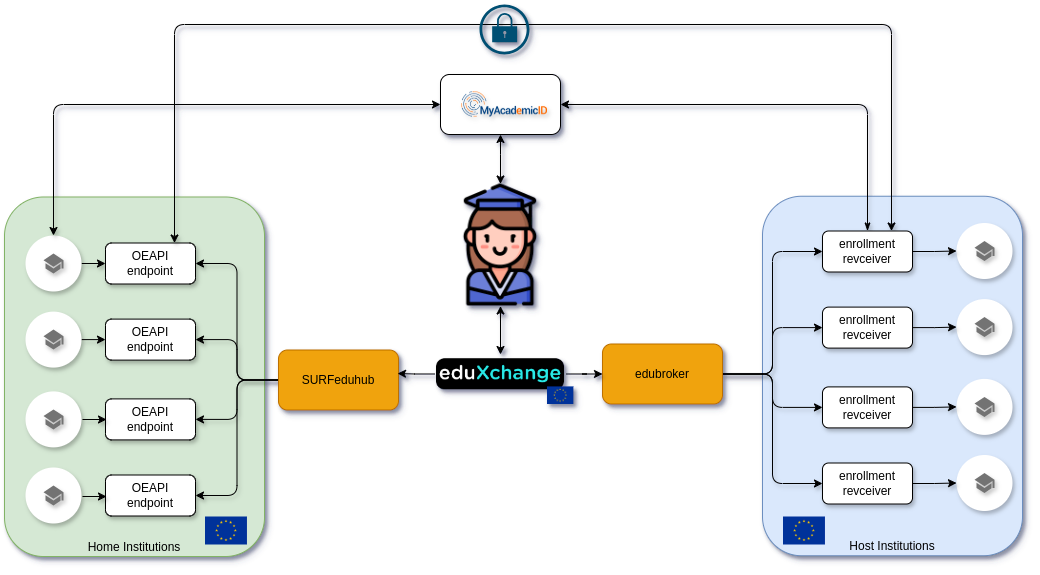
Zoomed in on enrollment

About OOAPI
- How to connect OOAPI endpoints?
- What OOAPI endpoints are needed for enrollment?
These endpoints will be protected using oauth tokens.
- Where can I find an example of protecting my API (
/persons//associations/) using oauth/MyAcademicID?
About the broker
- What is the edubroker?
- The edubroker is a component hosted by SURF that initiates the enrollment-process for a student. The broker provides a visual interface with feedback for the student.
- How can I enable the edubroker for my offerings on the frontend?
- Currently, when a student clicks on a enrollment button in eduxchange.eu, the student is sent to a form or an email. After installing the enrollmengt receiver and connecting it to your SIS it can be enabled in the catalog. To enable the broker for your offerings, SURF has to change a setting for you. Ask SURF if you want to activate the broker for your offerings.
About enrollment
For enrollment to work, an institution has to implement functionality to play two “roles”:
- The Host Institution, where you receive incoming enrollment requests. The Host Institution sends several (OOAPI) requests (via the Enrollment Receiver) to the Home Institution of the student to:
- Get personal information about the student.
- Let the Home Institution know the students want to enroll at the Host Institution, giving the Home Institution a chance to allow or deny the enrollment.
- Check whether a student is still “active” at the Home Institution, for example just before the course starts.
- Inform the Home Institution that the students has cancelled the enrollment.
- Inform the Home Institution of the result that student achieved when the course has finished.
- The Home Institution, who will receive OOAPI requests from the Host Institution and responds to them. In the responses, the Home Institution can inform the Host Institution about decisions regarding the enrollment of the student.
In general, the Host Institution is in charge of the communication and will initiate requests. The Home Institution responds to those request.
- How does the enrollment work in general?
- What are the possible initial states of an association?
Extra notes about the API calls needed for the enrolment flow
GET /persons/me
This call is used to provide the Host institution with the personal information of the student that wants to enrol. Of special note is the activeEnrollment field. This boolean should indicate whether the students is an “active student” at the Home institution. This could mean different things in different countries, but might include checks like: has the student payed their tuition, or does the student have an active enrolment in a bachelor or master programme?
Minimal required attributes for persons
person
- personId
- primaryCode, local identifier
- { codeType=ANY, code=ANY }
- givenName
- surname
- displayName
- activeEnrollment, This means something that determines if the student is currently active at their home university. I.e. have they paid their fees, are they on a current programme, etc. Either
trueorfalse. - nationality
- affiliations, almost always
student. - gender
- otherCodes
- [{ codeType=
schacHome, code=”SCHACHOME” }]
- [{ codeType=
Unique person identification
The /persons/me call needs to have a unique person identification to facilitate deduplication.
Within the alliance the personId can be used for this.
{
  "personId": "123e4567-e89b-12d3-a456-426614174000",
  ...
}
Issuer persons
To get the issuer of the /persons/me response one of the otherCodes field could be used. All institutions should use the same codeType, for example schacHome.
{
  "otherCodes": [
    {
      "codeType": "schacHome",
      "code": "dtu.dk"
    }
  ],
  ...
}
POST /associations/external/me
Once the Host institution has done the initial processing after the Enrollment Request starts, the Host should do a POST /associations/external/me request to the Home institution (via the enrollment receiver). The purpose of this call is to provide the Home Institution with enough information to make an informed decision about the enrollment request of the student. Therefore it should include information about:
- The association
- The offering the student is requesting to be enrolled in
- An expanded course attribute in the offering
- An issuer, e.g. information about the Host Institution
Minimal required attributes for associations
association
- role
- state
- remoteState
association.offering
- primaryCode
- { codeType=
offeringCode, code=offeringId }
- { codeType=
- offeringType
- name
- description
- teachingLanguage
- resultExpected
- startDate
- endDate
association.offering.course
- primaryCode
- { codeType=
courseCode, code=courseId }
- { codeType=
- name
- abbreviation
- description
- teachingLanguage
- level
association.issuer
- primaryCode
- { codeType=
schacHome, code=”SCHACHOME” }
- { codeType=
- organizationType
- name
- shortName
Note: courseCode is missing in the OOAPI spec and should be added there in the future.
state and remoteState
The state and remoteState fields are used to communicate about the enrolment state between the two institutions. Because OOAPI is based on the REST paradigm, it describes resources being manipulated on the server. For the POST /associations/external/me call this has the following consequences:
- The
remoteStatefield contains the initial state of the Host institution. The logic for this is as follows: the Host institution is sending a request to the Home institution to create an association. From the perspective of the Home institution, the state of the Host is theremoteState. - The
statefield is mandatory in OOAPI. However, during when sending the initialPOST, the Host cannot know what thestateof the Home will be. Therefore the state should just be set toassociatedbut it doesn’t have a real meaning at this stage. - The Home institution will respond to the request with their initial
statein the HTTP response.
Issuer associations
To set the issuer of the /associations/external/me request the primaryCode field should be used in the body. All institutions should use the same codeType, for example schacHome.
{
  "issuer": {
    "primaryCode": {
        "codeType": "schacHome",
        "code": "dtu.dk"
    },
    ...
  }
  ...
}
View a full example for the body of this request
PATCH /associations/{associationId}
With this call the Host institution can inform the Home institution about any updates to its associationState. There are several reasons why this is needed:
- If the Host institution communicated a
pendingorqueuedstate to the Home institution during the initial enrolment flow, the Host has to update Home institution when the state progresses toassociatedordenied. - If the student cancels the enrolment (for example using some out-of-band process, like sending an email to the student administration of the Host institution), the Host should inform the Home by communicating the
canceledstate.
To update the Home institution, the Host institution should use the remoteState field in the PATCH request.
GET /associations/{associationId}
With this call the Host institution can request the current associationState from the Home institution. This is needed when the Home institution returned a pending state during the initial enrolment flow. The Host institution should then poll the Home institution (for example using a cron job) to check whether the Home institution has reached a new state.
In the response to this call, only required fields are necessary:
associationIdassociationTyperolestate
About the enrollment receiver
-
How do I install or the enrollment receiver?
- It’s advised to use the docker image as described here
-
Can you tell me more about the communication between the generic part of the enrollment receiver and the custom implementation at the host institution?
-
Do you have an example configuration of the enrollment receiver?
-
What is the response from the SIS to the enrollment receiver?
-
After processing the enrollment request in the host institution, and informing the home institution a response is returned to the enrollment receiver. The HTTP status code should always be 200, and the response should look like this:
{
  "result": "ok",
  "code": 200,
  "message": "Message to show to the student",
  "oo-api-offering-id": "offeringId_value_here",
  "redirect" : "https://optional.redirect/for-extra-information"
}
For the
codeuse these values:Value Label 200 200 - All is good 400 400 - Backend error 404 404 - Person not found 409 409 - Queue-session validation failed 412 412 - Invalid enrollmentRequest 417 417 - Token request failed 419 419 - eduID not present in the ARP 422 422 - Administrative error (already enrolled) 500 500 - Not so good If a value is present for
redirect, the user will be asked to provide extra information. A button will be shown sending the user to the form in a new window. Leave out this field if no extra form is required.If enrollment is denied for any reason, use HTTP code 200 and ‘code’ 400 in the json message. Mention the reason for denying in the
messagefield. This message will be shown to the end user directly, so be short and clear.
-
About openID and MyAcademicID
-
What are the url’s for starting authentication/introspection/tokens at MyAcademicID?
- The MyAcademicID endpoints for openID can be found in the well-known location. Please use a widely used library for all openID parts, instead of building it.
-
How can we start an enrollment for testing?
-
There is a demo enrollment broker available for testing.
-
To connect to the demo enrollment broker, edit this yaml document and send it to Peter or Jelmer:
schacHome: demoinst02.eduxchange.eu
name: Demo 02 home  # The display name for your institution
abbreviation: Demo02home  # The short name
courseEndpoint: "https://demoinst02.eduxchange.eu/basic/offerings"  # The OOAPI endpoint for offerings, Not used when useEduHubForOffering=True
courseAuthentication: BASIC  # For authenticating to the offerings endpoint, Not used when useEduHubForOffering=True
courseAuthenticationUserName: "user"  # For authenticating to the offerings endpoint, Not used when useEduHubForOffering=True
courseAuthenticationPassword: "secret"  # For authenticating to the offerings endpoint, Not used when useEduHubForOffering=True
personsEndpoint: "https://demoinst02.eduxchange.eu/persons/me"  # The OOAPI endpoint for persons
personAuthentication: HEADER  # Should always be HEADER for token based authentication
associationsEndpoint: "https://demoinst02.eduxchange.eu/associations" # The OOAPI endpoint for associations
authenticationEndpoint: "https://demoinst01.eduxchange.eu/api/enrollment" # This is on the enrollment-receiver
registrationEndpoint: "https://demoinst01.eduxchange.eu/api/start"  # This is on the enrollment-receiver
registrationUser: "user"  # These are configured in the broker section of the enrollment-receiver config file
registrationPassword: "secret"  # These are configured in the broker section of the enrollment-receiver config file
logoURI: https://static.surfconext.nl/logos/idp/surf.png # The logo to be displayed for your institution
scopes: email schac_personal_unique_code demoinst02.eduxchange.eu/persons demoinst02.eduxchange.eu/results # Always "email schac_personal_unique_code" plus the scopes required for accessing the persons and associations endpoints
privacyEndpoint: https://www.surf.nl/studentmobiliteit  # A link to the privacy declaration
useEduHubForOffering: True # Should always be True for EuroTeq
useQueueIt: False # Should always be False for EuroTeq
-
-
What are scopes? What should I use for scopes?
Scope is a mechanism in OAuth 2.0 to limit an application’s access to a user’s account. An application can request one or more scopes, this information is then presented to the user in the consent screen, and the access token issued to the application will be limited to the scopes granted.
For EuroTeQ, two general scopes are used:
email: To retrieve the user’s home institution emailschac_personal_unique_code: To retrieve the user’s identifier at the home institution
Also, two institution specific scopes are used:
persons: Personal Informationresults: Enrollment and results
To make the scope identifier unique, the institution’s primary domain is added. So to request access to the personal data of a student of MyUniversity, the scope
institution.tld/personsis requested.Currently, these scopes are known for EutoTeQ institutions:
demoinst01.eduxchange.eu/personsdemoinst01.eduxchange.eu/resultsdemoinst02.eduxchange.eu/personsdemoinst02.eduxchange.eu/resultstaltech.ee/personstaltech.ee/resultsdu50.vc.cvut.cz/eq/resource/v5/personsdu50.vc.cvut.cz/eq/resource/v5/resultstechnion.ac.il/personstechnion.ac.il/resultstueacc-surf.osiris-link.nl/personstueacc-surf.osiris-link.nl/results
When receiving a token, the MyUniversity’s API endpoint must validate if the scope is valid for the API being called.
The scopes are passed to the intekenontvanger-generiek from the broker. The Intekenontvanger-generiek will handle the authentication and add the necessary scopes. The scopes for each institution are configured in the service registry.
If the scopes are not configured for your resource server (OOAPI endpoint) mail them to
support@myacademicid.orgto have them added.You will only receive the
emailclaim,schac_personal_unique_idis not available yet. -
How do I connect to MyAcademicID?
- The enrollment receiver needs to be connected as a relying party to MyAcademicID. The API server needs to be connected as a Resource Server. Both can be registered by filling in the MyAcademicId registration form
-
How does this OpenID connect Oauth thing work? What is the flow for token introspection?
- Here is a nice explanation of how OpenID connect works.
- The OpenID Connect flow is projected on the EuroTeQ usecase in this diagram
-
How do I do introspection?
-
Example using curl:
curl -k -u RS-Client-ID:RS-CLIENT-Secret -H 'Content-Type: application/x-www-form-urlencoded' -X POST --data 'token=eyJhbGciOiJFUzI1NiIsImtpZCI6Ik1sVm9jb...' https://proxy.prod.erasmus.eduteams.org/OIDC/introspect -q | jq -
Example Response:
{ "active": true, "scope": "openid email schac_personal_unique_code institution.tld/persons institution.tld/results", "client_id": "APP-02BDEC4A-6B0D-4488-8932-4E92A8A80F71", "exp": 1730715844, "iat": 1730712244, "sub": "ae3881fe8102b250e1d0766c600010a85faa9b19@myacademicid.org", "iss": "https://proxy.prod.erasmus.eduteams.org", "token_type": "Bearer", "aud": [ "APP-02BDEC4A-6B0D-4488-8932-4E92A8A80F71" ], "email": "user.email@institution.tld" } -
In the response validate
"active": trueand the scopes for your institution are present. In the exampleinstitution.tld/personsandinstitution.tld/results -
Use the email to look up your user
-
And more
Testing
- How can I test the registration flow?
Status
- Where can I see what has to be done, and what has already been done by all institutions?